Short Answer
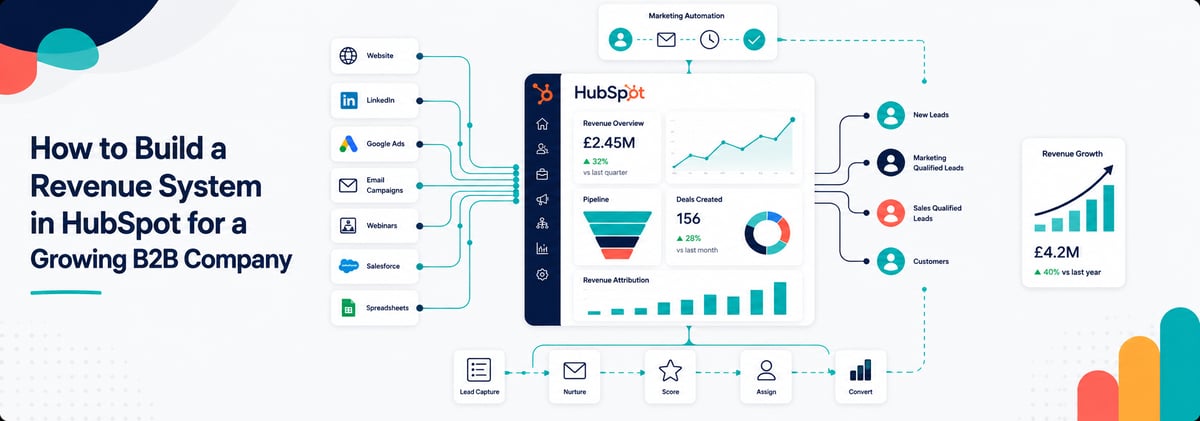
A good HubSpot revenue system connects your website, CRM, lifecycle stages, sales process, reporting and automation into one operational setup focused on revenue growth. Instead of treating HubSpot as separate marketing and sales tools, growing B2B companies should build a connected system where leads move cleanly from website conversion through to pipeline, reporting and customer growth.
The goal is not simply implementing HubSpot. The goal is building a scalable revenue engine.
Quick Answer: What Does a Good HubSpot Revenue System Include?
- Clear lifecycle stages
- Connected website and CRM tracking
- Structured sales pipelines
- Lead routing and ownership
- Marketing attribution
- Automated lead nurturing
- Reliable reporting dashboards
- CRM data governance
- AI-ready workflows and data
- Sales and marketing alignment
- Campaign-to-revenue visibility
- Defined conversion processes
What Is a Revenue System in HubSpot?
A revenue system is the connected operational setup that controls how leads become revenue.
In HubSpot, that means connecting:
- your website
- CRM
- marketing automation
- sales process
- reporting
- lifecycle stages
- AI workflows
- customer data
Most B2B businesses already have the tools.
The problem is the tools are disconnected.
Marketing generates leads. Sales manages deals. The website captures forms. Reporting sits somewhere in the middle. Nobody fully trusts the data.
A proper revenue system connects all of those functions into one measurable commercial process.
How Do You Build a Revenue System in HubSpot?
You build a HubSpot revenue system by designing the commercial process first, then configuring HubSpot around it.
Many businesses make the mistake of starting with workflows and dashboards before defining:
- how leads should move
- who owns them
- what qualifies them
- how pipeline stages work
- how reporting should function
HubSpot should support the revenue strategy, not dictate it.
What Should a Good HubSpot Setup Look Like for a Growing B2B Company?
A good HubSpot setup should be simple enough for adoption but structured enough to scale.
A strong HubSpot setup usually includes:
|
Area |
What good looks like |
|
Website |
Connected forms, CTAs and attribution |
|
CRM |
Clean structured data with governance |
|
Lifecycle stages |
Clearly defined lead progression |
|
Sales pipeline |
Buyer-focused deal stages |
|
Reporting |
Trusted commercial visibility |
|
Automation |
Simple operational support |
|
Marketing |
Campaigns linked to pipeline |
|
AI |
Built on reliable CRM data |
|
Teams |
Shared processes and ownership |
The best setups are operationally clear.
If teams need spreadsheets to compensate for HubSpot, the system usually needs rebuilding.
How Do You Connect Your Website, CRM and Sales Pipeline?
You connect them through structured data flow and defined lifecycle logic.
That means:
- website forms creating properly attributed leads
- lifecycle stages updating automatically
- lead scoring triggering sales engagement
- pipelines reflecting the actual sales process
- reporting tracking conversion through the funnel
Example of a connected revenue system
|
Stage |
Connected system behaviour |
|
Website visit |
Visitor tracked by source |
|
Form submission |
Lead enters HubSpot with attribution |
|
Lead qualification |
Lifecycle stage updates automatically |
|
Sales engagement |
Tasks and routing triggered |
|
Deal creation |
Pipeline reporting updates |
|
Closed revenue |
Marketing attribution retained |
Without those connections, reporting breaks quickly.
Why Do Most HubSpot Setups Become Messy Over Time?
Most HubSpot portals evolve reactively.
Teams add:
- workflows
- properties
- dashboards
- integrations
- pipelines
- automation
But few businesses stop to redesign the full revenue process.
The result is usually:
- duplicated workflows
- inconsistent lifecycle stages
- poor reporting
- unclear ownership
- sales frustration
- disconnected marketing data
- unreliable forecasting
HubSpot rarely becomes the problem itself.
The lack of system design becomes the problem.
What Lifecycle Stages Should a B2B Company Use in HubSpot?
Lifecycle stages should reflect commercial intent and operational ownership.
The exact stages vary by business, but most B2B companies need:
- Subscriber
- Lead
- Marketing Qualified Lead (MQL)
- Sales Qualified Lead (SQL)
- Opportunity
- Customer
- Evangelist
The important part is not the labels.
The important part is:
- what moves a lead between stages
- who owns each stage
- what automation supports it
- how reporting uses it
Common lifecycle mistake
Marketing marks leads as MQLs too early.
Sales ignores them because qualification criteria are unclear.
This creates tension between teams and damages reporting accuracy.
How Important Is the Website in a HubSpot Revenue System?
The website is often the starting point of the revenue system.
It should not operate separately from the CRM.
Your website should:
- capture conversion intent
- track attribution properly
- support lifecycle progression
- connect to reporting
- support lead nurturing
- feed sales visibility
Many businesses redesign websites visually while ignoring conversion infrastructure.
That usually creates:
- poor attribution
- weak lead quality
- disconnected reporting
- low conversion rates
A revenue system approach treats the website as part of commercial operations, not just branding.
What Role Does AI Play in a Revenue System?
AI should improve operational efficiency, lead management and reporting quality.
But AI only works properly when the underlying CRM structure is reliable.
Good AI use cases inside a revenue system
- lead scoring support
- sales activity recommendations
- automated enrichment
- reporting summaries
- workflow optimisation
- content assistance
- conversation intelligence
Bad AI use cases
- applying AI to messy CRM data
- automating broken processes
- generating reports from inaccurate attribution
- replacing operational clarity with automation
AI should sit on top of a strong revenue system, not compensate for a weak one.
How we can help
If your HubSpot setup feels operationally busy but commercially unclear, the issue is often the underlying revenue system design.
Imagine Growth’s Revenue System Build helps B2B companies connect:
- HubSpot
- website performance
- lifecycle stages
- sales pipelines
- reporting
- automation
- AI enablement
The outcome is a revenue system designed around growth, not disconnected tools.
Speak to us to learn more.

What Should You Build First in HubSpot?
Start with operational foundations before advanced automation.
Recommended order for building a HubSpot revenue system
- CRM structure and governance
- Lifecycle stage definitions
- Sales pipeline design
- Website tracking and attribution
- Lead routing and ownership
- Reporting foundations
- Marketing automation
- AI enablement
Many businesses start at step seven.
That usually creates operational confusion later.
Practical Revenue System Build Checklist
CRM Foundation
- Are properties standardised?
- Is duplicate management controlled?
- Are teams using consistent processes?
- Is ownership clear?
Website and Conversion
- Are forms mapped correctly?
- Is attribution tracking working?
- Are conversion points aligned to pipeline goals?
- Are CTAs measurable?
Lifecycle Management
- Are lifecycle stages documented?
- Are qualification rules agreed?
- Is automation updating stages correctly?
Sales Process
- Are pipelines simple and accurate?
- Are deal stages buyer-focused?
- Is forecasting reliable?
Reporting
- Can leadership trust the data?
- Can pipeline be tracked by source?
- Is marketing tied to revenue outcomes?
AI Readiness
- Is CRM data structured properly?
- Are workflows documented?
- Is reporting accurate enough for AI analysis?
Common Revenue System Build Mistakes
Treating HubSpot as separate departments
Marketing, sales and operations should not run disconnected systems inside the same platform.
Building automation before process clarity
Automation scales problems if the underlying process is weak.
Overcomplicating pipelines
Complex deal stages reduce adoption and damage forecasting.
Ignoring attribution setup
Without proper attribution, budget decisions become guesswork.
Letting the website operate separately from CRM strategy
Your website should support lead progression and reporting, not just branding.
When Should You Get Expert Help Building a Revenue System?
You should consider expert support when:
- HubSpot has become difficult to manage
- reporting cannot be trusted
- marketing and sales operate differently
- teams use spreadsheets outside the CRM
- automation feels risky to change
- lifecycle stages are inconsistent
- forecasting is unreliable
- AI initiatives are blocked by messy data
Building a revenue system requires both technical HubSpot knowledge and commercial process experience.
Most businesses need both perspectives.
What Makes a Revenue System Different From a Standard HubSpot Implementation?
A standard implementation focuses on tools.
A revenue system focuses on commercial outcomes.
HubSpot Implementation vs Revenue System Build
|
Standard Implementation |
Revenue System Build |
|
Portal setup |
Commercial process design |
|
Workflow creation |
Revenue flow optimisation |
|
Dashboard setup |
Revenue visibility |
|
Tool configuration |
Sales and marketing alignment |
|
CRM admin |
Operational scalability |
|
Technical deployment |
Revenue performance |
The difference is whether HubSpot supports growth strategically or simply stores data.
FAQs About Building a Revenue System in HubSpot
What is a revenue system in HubSpot?
A revenue system is the connected setup linking website conversion, CRM management, lifecycle stages, sales process, reporting and automation into one operational framework.
How do you structure HubSpot for a growing B2B business?
Start with lifecycle stages, CRM governance, sales pipelines and attribution before building automation and AI workflows.
What should a HubSpot sales pipeline look like?
Pipelines should reflect buyer progression, not internal admin tasks. Simpler pipelines usually improve adoption and forecasting accuracy.
How do you connect HubSpot to your website properly?
Connect forms, attribution tracking, CTAs, lifecycle automation and reporting so website activity links directly to pipeline outcomes.
Can HubSpot improve sales and marketing alignment?
Yes, when lifecycle stages, ownership rules and reporting are clearly defined across both teams.
Should AI be part of a HubSpot revenue system?
Yes, but only after CRM structure, reporting and operational processes are reliable enough to support automation and AI analysis.
How long does it take to build a revenue system in HubSpot?
Most projects take several weeks to several months depending on CRM complexity, integrations, website requirements and reporting needs.
Summary
Most growing B2B companies do not need another disconnected tool.
They need a connected revenue system.
Imagine Growth’s Revenue System Build helps businesses align:
- HubSpot
- website performance
- lifecycle stages
- sales pipelines
- reporting
- AI workflows
- demand generation
The result is a cleaner operational setup, better visibility and a system designed to support scalable revenue growth.
If your CRM, website and reporting currently feel disconnected, rebuilding the revenue system is usually the fastest way to improve performance.
Speak to us if you want expert help.